Android APK and iOS PWA
Android players install the 247Vibes APK directly from the site; iOS players add the PWA shortcut in Safari with no App Store required for either.
App at 247Vibes: PWA for iOS & Android
Take 247Vibes with you: install the Android APK or add the iOS PWA to your home screen for instant access to slots, live tables and sports betting.
Your Casino in Your Pocket
Take 247Vibes with you: install the Android APK or add the iOS PWA to your home screen for instant access to slots, live tables and sports betting.
Open on Mobile Play responsibly: our games are for those 18 and older, and every bonus carries its own terms.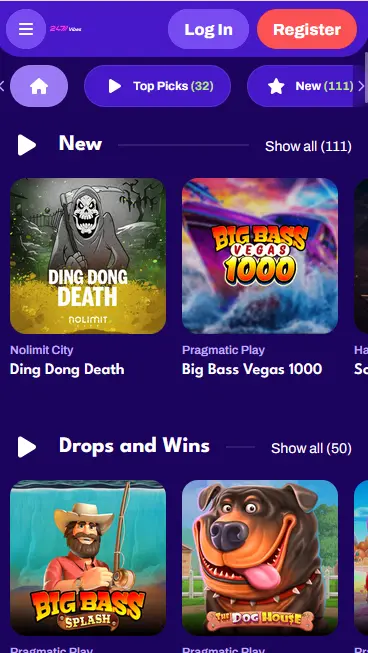
Installing 247Vibes
App Overview
Pros
Cons
App Features
Android APK and iOS PWA
Android players install the 247Vibes APK directly from the site; iOS players add the PWA shortcut in Safari with no App Store required for either.
Full Game Catalogue
Slots from Pragmatic Play, Hacksaw Gaming and Nolimit City, plus live tables from Evolution Gaming, Pragmatic Play Live and Ezugi, all available in the app.
Encrypted Connections
Every session in the 247Vibes app is secured by TLS encryption, keeping your account credentials and payment details protected.
Mobile Security
What You Should Do
What You Should Avoid
Device Requirements
Android
iOS
All deposit methods available on the 247Vibes desktop site are fully accessible within the Android APK and iOS PWA. Deposits are accepted via Visa, Mastercard, Skrill, Neteller, Paysafecard, MiFinity, Open Banking/Revolut, and Cashlib, with a minimum deposit of €20 per transaction.
| Method | Type | Min | Max | Processing |
|---|---|---|---|---|
| Visa | Card | €20 | €2,000 | Instant |
| Mastercard | Card | €20 | €2,000 | Instant |
| Skrill | E-Wallet | €20 | €2,000 | Instant |
| Neteller | E-Wallet | €20 | €2,000 | Instant |
| Paysafecard | E-Wallet | €20 | €2,000 | Instant |
| MiFinity | E-Wallet | €20 | €2,000 | Banking hours |
| Open Banking/Revolut | Bank Transfer | €20 | €2,000 | Banking hours |
| Cashlib | Voucher | €20 | €150 | Instant |
| Bank Transfer | Withdrawal | €25 | €2,000 | 3-5 business days |
All transactions processed through the app are protected by TLS encryption, the same standard used on the desktop site. No card details or authentication tokens are retained on the device after a session ends. Any unrecognised transaction on your account should be reported immediately to [email protected].
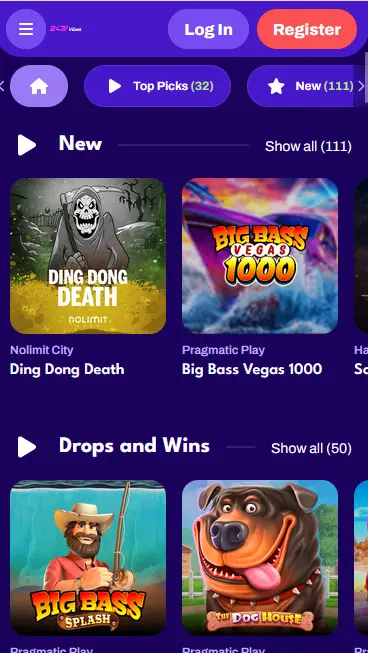
The entire 247Vibes slots catalogue is available within the Android APK and iOS PWA. Sweet Bonanza from Pragmatic Play (RTP 96.50%), Book of Dead from Play’n GO (RTP 96.21%), and Gonzo’s Quest from NetEnt (RTP 96.00%) load at the same quality as the desktop site. Wanted Dead or a Wild from Hacksaw Gaming and Money Train 2 from Relax Gaming are available in the mobile lobby alongside titles from Nolimit City, Red Tiger Gaming, Betsoft, Yggdrasil, and Playson.
Live dealer streams from Evolution Gaming, Pragmatic Play Live, and Ezugi run within the app without additional plugins. Lightning Roulette, Speed Roulette, Monopoly Live, and Crazy Time from Evolution Gaming stream in high definition on mobile connections. The live catalogue in the app matches the full desktop selection without reduction.
RNG-based table games including Classic Blackjack Pro and Premium European Roulette are available in the app lobby. These titles load quickly due to their lower graphics footprint relative to high-volatility video slots.
Mega Moolah from Microgaming is accessible in the app and maintains its real-time jackpot connection. The prize counter updates live regardless of whether the player is on desktop or mobile.
The 247Vibes Android app is distributed as an APK file downloaded directly from 247vibes.app, without requiring a Google Play account or appearing in the Play Store. Android 6.0 or a later version is recommended for full functionality and stable live casino streaming.
iOS users install the 247Vibes Progressive Web App by adding it to the home screen through Safari. The PWA runs as a standalone window without browser navigation bars, providing the appearance and behaviour of a dedicated app. iOS 14 or later is recommended for optimal performance across all game formats.
| Platform | Install Method | Recommended OS | Storage |
|---|---|---|---|
| Android | APK from 247vibes.app | Android 6.0 or later | ~20-40 MB |
| iOS | PWA via Safari | iOS 14 or later | Minimal (web-based) |
Open 247vibes.app on your Android device and locate the app download link on the page. Tap to begin saving the APK file. When the download completes, Android may display a security prompt requesting permission to install apps from this source; navigate to Settings, find the Security or Apps section, and enable installation from your browser. Return to the downloaded file and tap Install. The 247Vibes icon appears on your home screen or in the app drawer within seconds of the installation completing.
Open 247vibes.app in Safari on your iPhone or iPad. Tap the Share button at the bottom of the screen, identifiable by the square icon with an upward-pointing arrow. Scroll through the options in the Share menu and select Add to Home Screen. Assign a name to the shortcut if you wish, then tap Add. The 247Vibes icon is placed on your home screen and launches the site in a standalone, full-screen view on every subsequent tap.
Android users who prefer not to enable third-party APK installation can also add the PWA shortcut through a Chromium-based browser. Open 247vibes.app in Chrome on Android and accept the browser prompt to add the site to the home screen, or access the same option from the browser menu. The resulting shortcut functions identically to the iOS PWA, providing a home-screen icon without the APK installation process.
The 247Vibes app provides access to the complete 13-provider games catalogue, the live casino lobby with Evolution Gaming, Pragmatic Play Live, and Ezugi, and the sports betting section from a single interface. Cashier functions, bonus activation, account management, and identity document upload for KYC verification are all handled within the app, with no feature requiring a return to the desktop site.
The Android APK and iOS PWA both operate as standalone windows, removing the browser address bar and providing more vertical screen space for the game or sports interface. On the Android APK, push notifications can inform players of newly activated promotions without requiring the app to be open. Beyond these presentation differences, the app carries the same feature set as the responsive desktop site, including all supported payment methods, the full live casino lobby, and the sports section.
New players can register directly from within the 247Vibes app or PWA. Open the app, tap Register, and complete the sign-up form with your full name, date of birth, email address, and a chosen password. Players must be 18 or over, as required under the Tobique Gaming Commission licence No. 0000049. Confirm the registration email to activate the account.
Returning players enter their registered email address and password on the app login screen. Two-factor authentication, if active on the account, requires a valid one-time code from an authenticator app at every sign-in. Where biometric authentication is supported by the device and enabled in account settings, fingerprint or Face ID can be used to sign in from the second login onwards.
The Pick Your Way In welcome offer is fully available through the app. Open the cashier, choose your payment method, and select either the 150% deposit bonus or the 300 free spins before confirming a first deposit of €20 or more. The bonus credits immediately after the payment clears. Wagering requirements, validity windows, and game contributions are detailed on the full bonus page. 18+ only.
Seasonal promotions may be made available specifically for mobile users and are shown in the app’s promotions section when active. The Midweek, Your Move reload (30% bonus or 60 free spins) and Weekend Happy Hour (30% up to €150) are accessible through the app promotions tab during their qualifying windows, alongside any time-limited mobile campaigns that may be running. 18+ only.
Data exchanged between the 247Vibes app and the casino’s servers is secured by TLS encryption at all times, covering login credentials, game session data, and payment information. No sensitive data is retained on the device after the session ends.
Two-factor authentication is available from the security section of the account dashboard within the app. Once enabled, a one-time code from an authenticator application is required at every sign-in, providing protection against unauthorised access even if the password is leaked. The 2FA setting is account-wide and applies to sign-ins on all platforms simultaneously.
Android and iOS devices that support fingerprint or Face ID recognition can be used to sign in to the 247Vibes app after the initial password-based login, provided the feature has been enabled in account settings. Biometric data is handled exclusively by the device’s native security framework and is never transmitted to or stored by 247Vibes.
Support for all app-related matters, including APK installation assistance, PWA setup, in-app payment queries, and account recovery, is available by emailing [email protected]. The support team handles enquiries from both mobile and desktop users through the same contact point.
Players wishing to manage their gambling activity can request deposit limits, session time limits, or self-exclusion by contacting [email protected]. Responsible gaming measures are applied across all access methods, including the Android APK and iOS PWA, under the terms of the Tobique Gaming Commission licence No. 0000049.
App Questions
No, the 247Vibes Android app is an APK file downloaded directly from 247vibes.app and does not require Google Play or a Google account.
No, iOS support is provided through a PWA added to the home screen via Safari; it works like a native app but is not listed in the App Store.
Yes, all payment methods from the desktop site, including Skrill, Neteller, Visa, Mastercard, Paysafecard and MiFinity, are available in the app cashier.
Download the App
Grab 150% up to €300 and 300 free spins.
Enter the Casino Play responsibly: our games are for those 18 and older, and every bonus carries its own terms.